How to Improve WordPress SEO: A Complete Guide for Better Rankings
In fact, if you want to learn how to improve WordPress SEO, you need more than a plugin and a few keywords.
Also, a solid WordPress SEO strategy combines technical setup, useful content, keyword research, internal linking, site speed, and mobile usability.
So, this guide walks through each piece step by step, showing you how to improve WordPress SEO so you can build a site with a real shot at organic traffic from Google.
What Is WordPress SEO?
Basically, WordPress SEO is the process of optimizing a WordPress site so search engines can understand, crawl, index, and rank its pages effectively.
In fact, search engines weigh many signals when deciding what to show for a query, so SEO covers both technical improvements and content quality.
So, a well-optimized WordPress site typically has:
- A clear website structure
- SEO-friendly URLs
- Helpful, original content
- Fast loading pages
- Mobile-friendly design
- Relevant internal links
- Optimized images
- Descriptive page titles
- Useful meta descriptions
- A working sitemap
- Secure HTTPS
- Relevant backlinks
Why WordPress SEO Matters
However, a beautiful website doesn’t automatically get traffic from search engines.
In fact, if Google can’t properly crawl or understand your site, your pages may struggle to appear for relevant searches — no matter how good they look.
So, a working SEO strategy can help you:
- Increase organic search visibility
- Attract visitors already searching for what you offer
- Build long-term, compounding traffic
- Improve overall user experience
- Generate more leads and enquiries
- Establish authority in your industry
Generally, SEO results build up over months, not overnight — the exact timeframe depends heavily on your site’s age, competition, content quality, and existing backlink profile.
WordPress SEO Setup
1. Make Sure Your Site Is Indexable
First, confirm search engines are actually allowed to index your site.
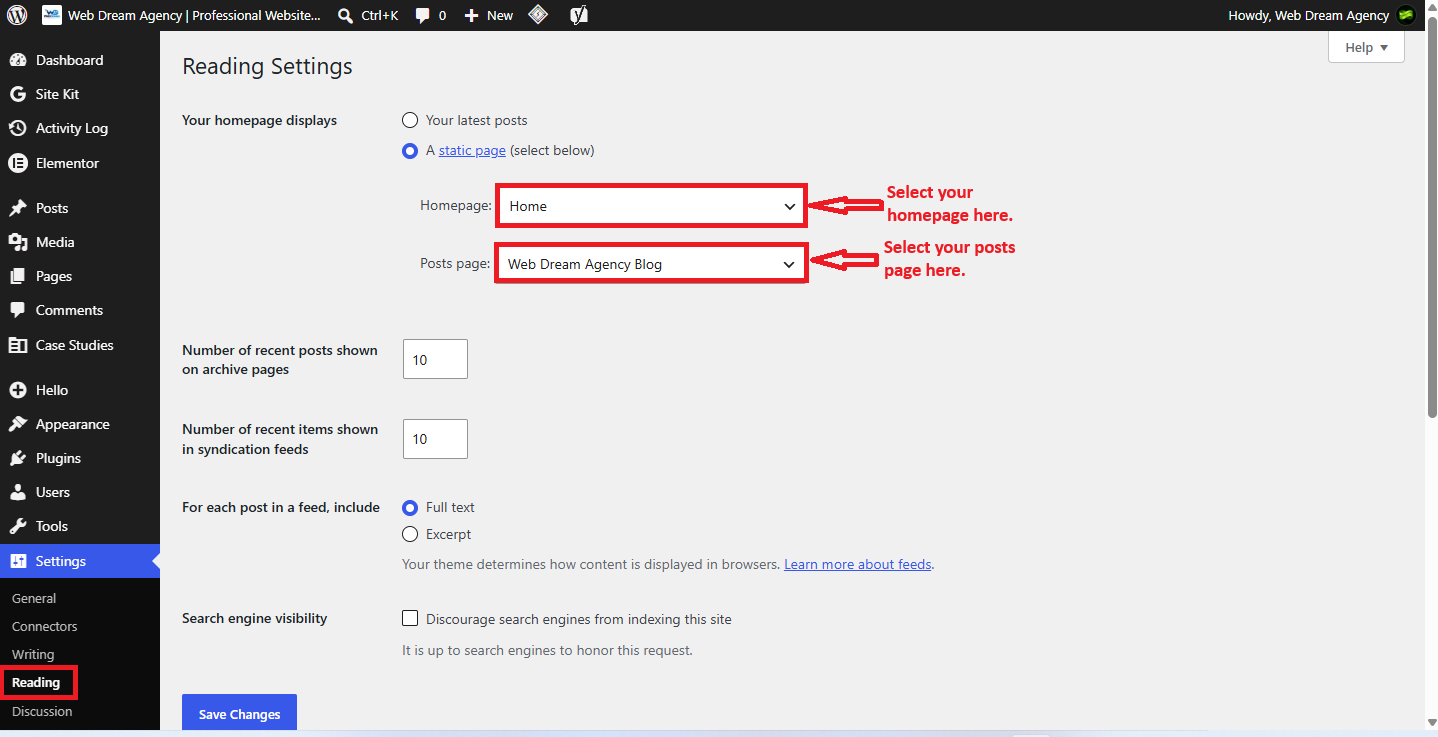
So, go to Settings → Reading → Search engine visibility and make sure “Discourage search engines from indexing this site” is unchecked.
In fact, this setting is often left on by accident after a site launch, so it’s worth double-checking.
2. Enable HTTPS
First, your site should run on HTTPS rather than HTTP. An SSL certificate encrypts the connection between your site and its visitors and protects data transferred through it.
Then, make sure your WordPress Address and Site Address URLs consistently use HTTPS.
Also, keeping WordPress core, themes, and plugins updated also matters — a secure site is a better experience for visitors and reduces the risk of security issues.
3. Choose a Lightweight Theme
For example, your theme affects both performance and usability. A theme loaded with excessive scripts or bloated code can slow your pages down, and as a result, visitors may leave before the page even finishes loading.
So, when choosing a theme, look for:
- Responsive design
- Clean, lightweight code
- Regular updates
- Good accessibility
- Fast loading performance
However, don’t pick a theme purely because it looks attractive — performance and usability matter just as much.
4. Configure an SEO Plugin
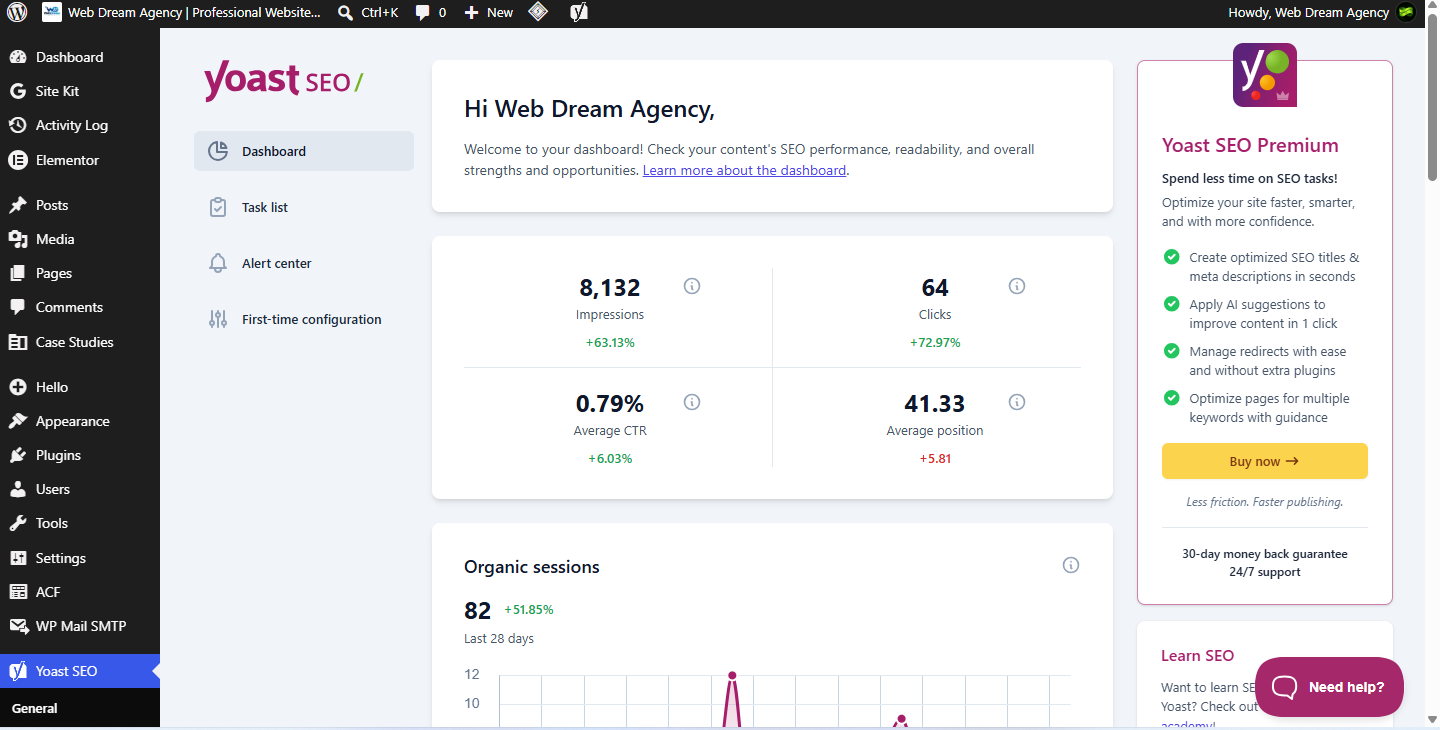
For example, an SEO plugin makes many optimization tasks easier to manage, including SEO titles, meta descriptions, XML sitemaps, canonical URLs, schema markup, and breadcrumbs.
| Plugin | Best For | Free Version | Key Features |
|---|---|---|---|
| Yoast SEO | Beginners and bloggers | Yes | Readability analysis, sitemaps, schema, redirects (premium) |
| Rank Math | Users wanting more free features | Yes | Built-in schema types, 404 monitor, Search Console integration |
| All in One SEO | Ease of use | Yes | Setup wizard, local SEO, WooCommerce SEO |
| SEOPress | Developers and agencies | Yes | White-label options, lightweight code, granular controls |
However, keep in mind that a plugin doesn’t automatically make your site rank — it’s a tool that helps you implement good SEO decisions, not a substitute for them.
5. Set SEO-Friendly URLs
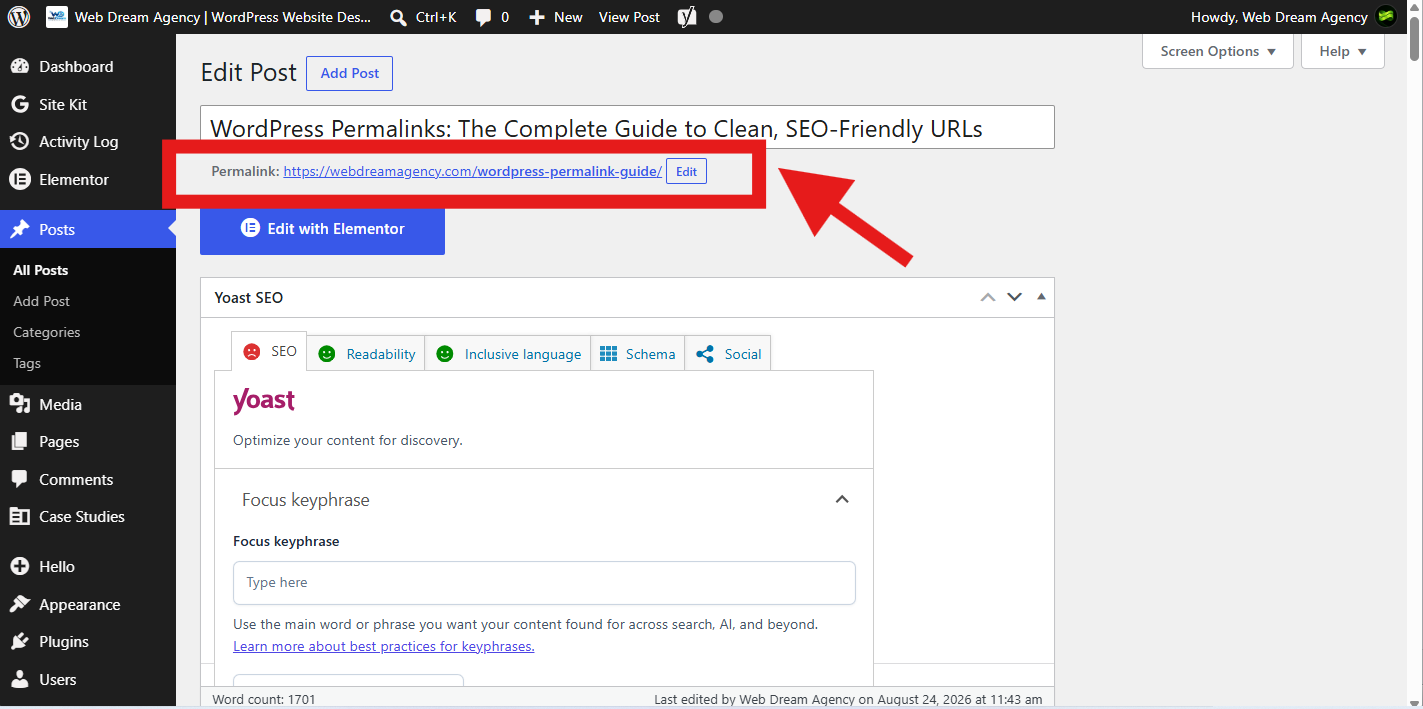
Basically, your URLs should be short, descriptive, and easy to read at a glance.
Example: Changing a URL like /?p=123 to /wordpress-seo-guide/ makes it immediately clear what the page is about, for both users and search engines.
Then, to change your permalink structure, go to Settings → Permalinks → Post name and save your changes.
Keyword & Content SEO
6. Research the Right Keywords
First, keyword research is one of the foundations of effective SEO. Before writing an article, find out what your audience is actually searching for.
Instead of targeting only a broad term like “WordPress SEO,” consider more specific, long-tail phrases:
- How to improve WordPress SEO
- WordPress SEO tips for beginners
- WordPress SEO checklist
- How to rank a WordPress website
As a result, long-tail keywords are usually less competitive and carry clearer search intent, which makes them especially useful for newer or smaller sites.
| Tool | Best For | Free Plan |
|---|---|---|
| Google Keyword Planner | Basic keyword volume and ideas | Yes |
| Ahrefs | Competitor research and backlink analysis | Limited |
| Semrush | All-in-one SEO and content research | Limited |
| Google Search Console | Tracking real queries for your own site | Yes |
7. Understand Search Intent
First, finding a keyword isn’t enough — you also need to understand why someone is searching for it.
| Intent Type | What the User Wants | Example Search |
|---|---|---|
| Informational | To learn something | “how to improve WordPress SEO” |
| Navigational | To find a specific site or page | “Yoast SEO login” |
| Commercial | To research products or services | “best WordPress SEO plugin” |
| Transactional | To take an action, like buying | “buy Rank Math PRO” |
For example, someone searching “how to improve WordPress SEO” wants an informative guide — not a sales page. Matching content to intent is what makes it rank and actually get read.
8. Create Genuinely Helpful Content
In fact, quality content is at the heart of SEO. It should answer real questions, solve real problems, and be written for the reader first — not stuffed with keywords.
So, a strong article should:
- Answer the main question quickly
- Cover relevant subtopics thoroughly
- Be easy to scan
- Include practical, actionable steps
- Get updated as information changes
Also, where you genuinely have it, first-hand experience — examples, case studies, or lessons from real projects — makes content noticeably more valuable and trustworthy.
9. Optimize Your SEO Title
So, the SEO title is one of the first things people see in search results, so it should clearly explain what the page offers.
Example: “How to Improve WordPress SEO: A Complete Guide” is far more descriptive than a vague title like “WordPress Tips.”
So, include your primary keyword naturally, but avoid stuffing multiple keywords into one title.
10. Write a Compelling Meta Description
Basically, a meta description summarizes your page in search results. It isn’t a direct ranking factor, but a well-written one improves click-through rate by giving searchers a clear reason to visit.
11. Use Headings Correctly
Also, headings make content easier to read and help search engines understand its structure.
Generally, use one H1 for the main title, H2 for major sections, and H3 for supporting subsections — organized in a logical hierarchy rather than randomly.
12. Use Your Focus Keyword Naturally
For example, your keyword should appear where it makes sense: in the title, intro, a heading or two, the URL, and naturally throughout the body.
So, focus each page on one clear primary topic while naturally covering closely related keywords and questions — a single page can rank for many related search queries, so this isn’t about repeating one exact phrase over and over.
On-Page SEO
13. Improve Your Internal Linking for WordPress SEO
Generally, internal links connect pages within your own site, helping both visitors and search engines navigate and understand your content.
Example: An article about WordPress SEO could link to a related page using descriptive anchor text such as “WordPress website design services” rather than generic text like “click here.”
However, relevance and site architecture matter more than the sheer number of links. A useful model is building “pillar” content around core topics, with supporting articles linking back to it — this creates a clear content hierarchy that search engines can follow.
14. Add Relevant External Links
Also, linking out to trustworthy, relevant sources — like Google Search Central or WordPress.org — can add credibility to your content.
However, only add external links when they genuinely support a claim or point readers somewhere useful, not to pad the link count.
15. Optimize Your Images for WordPress SEO
However, large, unoptimized images slow a site down. Resize and compress them before uploading, and consider modern formats like WebP for smaller file sizes without much quality loss.
Also, give image files descriptive names — “wordpress-seo-optimization.jpg” instead of “IMG12345.jpg.”
Alt text: write it primarily for accessibility, so it accurately describes meaningful images for people using screen readers. However, search engines also use this text to understand images, but that’s a secondary benefit, not the main purpose.
16. Use Breadcrumb Navigation
For example, breadcrumbs (for example: Home → Blog → WordPress SEO → SEO Guide) show visitors where they are on your site and help search engines understand how pages relate to one another. Most SEO plugins can generate these automatically.
Technical WordPress SEO
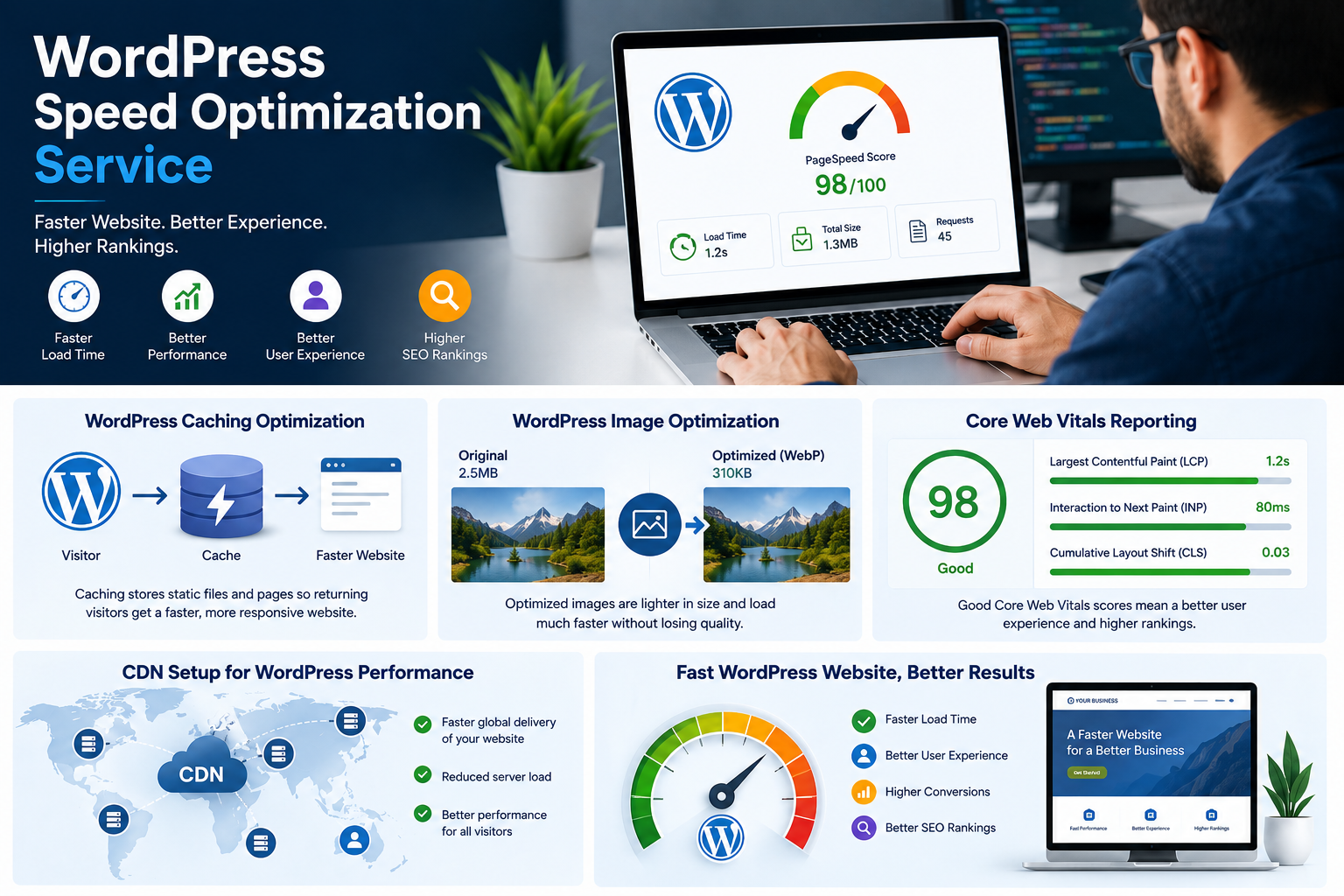
17. Improve Website Speed to Boost WordPress SEO
In fact, website performance matters for user experience and is one of the signals Google’s page experience systems take into account — though it’s one factor among many, not a simple “faster site = higher ranking” equation.
Also, slow pages can also make visitors more likely to leave before the content even loads. To improve speed, consider:
- Compressing images
- Using page and browser caching
- Removing unnecessary plugins
- Optimizing CSS and JavaScript
- Using a CDN and quality hosting
Then, test your site with Google PageSpeed Insights, make changes, then test again to confirm the improvement.
18. Make Your Site Mobile-Friendly
Generally, most web traffic comes from mobile devices, so your site needs to work smoothly on phones and tablets. Check that text is readable, buttons are easy to tap, menus work correctly, and content doesn’t overflow horizontally.
19. Create a Logical Website Structure
For example, a clear structure — Home, Services, Blog, About, Contact — helps both users and search engines understand your site. Important pages shouldn’t be buried several clicks deep in the navigation.
20. Create a Sitemap to Improve WordPress SEO
Basically, a sitemap helps search engines discover the important URLs on your site. Most modern WordPress setups, especially with an SEO plugin, generate an XML sitemap automatically — submit it through Google Search Console.
However, a sitemap doesn’t guarantee rankings; it simply helps search engines crawl your site more efficiently.
21. Fix Broken Links and Orphan Pages
So, regularly check your site for broken internal and external links, missing pages, and incorrect redirects.
Meanwhile, an orphan page — one with no internal links pointing to it — can be hard for both users and search engines to discover, so make sure every important page is connected to relevant content elsewhere on your site.
Off-Page SEO: Backlinks
22. Build High-Quality Backlinks to Improve WordPress SEO
Generally, backlinks from other websites can strengthen your site’s authority, but quality matters far more than quantity — a handful of relevant, trustworthy links outweighs dozens of low-quality ones.
So, practical ways to earn backlinks:
- Publish original research or industry statistics pages
- Write useful, in-depth guides other sites want to reference
- Contribute guest posts to relevant industry publications
- Try broken-link outreach — offering your content as a replacement for a dead link
- Pitch resource-page outreach to sites that curate helpful links
- Build free tools or calculators people naturally want to link to
Instead, avoid buying low-quality links or joining manipulative link schemes — these can do more harm than good.
Content Maintenance for Long-Term WordPress SEO
23. Keep Your Content Updated
However, SEO doesn’t end at publishing. Statistics go outdated, links break, and search intent shifts over time, so review important content regularly.
For example, during an update, check facts and statistics, links, images, the SEO title and meta description, and whether the content still matches current search intent. Showing a clear “Last updated” date can also reassure readers the information is current.
WordPress SEO Checklist
So, before publishing a page or article, run through this checklist:
- Search engine indexing is enabled
- HTTPS is working correctly
- SEO plugin is configured
- URL is short and descriptive
- Primary keyword has been researched
- Search intent has been considered
- SEO title and meta description are written
- Headings are organized properly
- Content is useful and original
- Internal and external links have been added
- Images are compressed with descriptive alt text
- Page works well on mobile and loads quickly
- Sitemap is available and broken links are checked
Frequently Asked Questions About WordPress SEO
1. What is WordPress SEO?
Basically, WordPress SEO is the process of optimizing a WordPress site so search engines can crawl, index, and rank its pages effectively.
2. How do I improve WordPress SEO for a new website?
First, start by enabling search engine indexing, installing an SSL certificate, choosing a lightweight theme, and setting up an SEO plugin like Yoast SEO or Rank Math.
3. Do I need an SEO plugin?
However, it isn’t strictly required, but it makes tasks like managing meta descriptions, sitemaps, and schema markup much easier to handle.
4. Which WordPress SEO plugin is best?
Generally, Yoast SEO, Rank Math, All in One SEO, and SEOPress are all solid choices — the best fit depends on your budget and the specific features you need.
5. How long does WordPress SEO take to show results?
Generally, it varies significantly depending on your site’s age, competition, content quality, and backlink profile — usually more months than weeks, with no fixed timeline.
6. Why isn’t my WordPress site showing up on Google?
Generally, common causes include disabled search engine visibility settings, a missing sitemap, thin content, or a site too new to have been fully indexed yet.
7. Does website speed affect WordPress SEO?
In fact, yes — performance is part of Google’s page experience signals, and slow pages can also push visitors to leave before content loads, even if speed alone isn’t the whole story.
8. How many keywords should I target per page?
So, focus each page on one clear primary topic while naturally covering closely related keywords — a page can rank for several related queries at once.
9. Do I need backlinks to rank?
However, on-page and technical SEO can help, but backlinks remain an important factor, especially for competitive keywords.
10. What is an XML sitemap and do I need one?
Basically, it’s a file listing your site’s important URLs so search engines can discover and crawl them efficiently — most SEO plugins generate one automatically.
Final Thoughts
In summary, learning how to improve WordPress SEO comes down to a combination of technical setup, useful content, smart keyword research, strong internal linking, fast performance, and a good user experience.
However, an SEO plugin is a useful first step, but it’s not the whole strategy — the real work is creating genuinely helpful content, organizing your site clearly, and improving the experience for visitors.
Finally, results build gradually. Keep publishing useful content, monitor Search Console, update older pages, and let the data guide what you improve next.